New Feature: AI-Powered Prompt Enhancement for Nano Banana
2025-10-23 • snapedit team • 6 min read
We're excited to announce a powerful new feature for Nano Banana: AI-Powered Prompt Enhancement! This feature uses advanced AI to automatically optimize your text prompts, helping you generate better, more professional-looking images with minimal effort.
What is Prompt Enhancement?
Prompt enhancement is an intelligent feature that takes your simple text descriptions and transforms them into detailed, professional prompts optimized for AI image generation. Instead of manually adding technical details about lighting, composition, and style, our AI does it for you.
Before and After Examples
Simple Input:
a cat sitting on a chair
AI-Enhanced Output:
A fluffy domestic cat sitting gracefully on a wooden chair,
illuminated by soft golden hour sunlight streaming through a nearby window,
creating warm rim lighting on its fur and gentle cast shadows on the surface,
photorealistic style with subtle ambient occlusion and natural depth
Chinese Example:
输入:
一只猫坐在椅子上
增强后:
一只毛茸茸的家猫优雅地坐在木椅上,
柔和的黄昏阳光从窗户照射进来,在猫咪的毛发上形成温暖的轮廓光,
地面上投下柔和的阴影,照片级真实风格,细腻的光影细节和自然景深
Key Features
🎨 Professional Lighting Descriptions
Our enhancement engine specializes in adding detailed lighting and shadow descriptions, including:
- Light Sources: Golden hour sunlight, soft window light, dramatic side lighting, backlit, rim light
- Light Quality: Soft diffused light, hard directional light, volumetric lighting, god rays
- Shadow Details: Soft cast shadows, long dramatic shadows, subtle shadow details
- Advanced Techniques: Chiaroscuro lighting, Rembrandt lighting, split lighting, butterfly lighting
🎯 Smart Context Awareness
The AI understands different scenarios:
- Text-to-Image Mode: Adds artistic details like lighting, composition, and style
- Image Editing Mode: Maintains references to uploaded images and focuses on editing instructions
- Already Detailed Prompts: Intelligently supplements missing elements without over-complicating
🌐 Bilingual Support
Full support for both English and Chinese prompts, with natural language enhancement in both languages.
⚡ Fast and Reliable
- Powered by Google Gemini 2.0 Flash for quick responses
- Built-in retry mechanism for network stability
- Real-time status feedback
How to Use
Using the prompt enhancement feature is simple:
Step 1: Navigate to Nano Banana
Go to the Nano Banana page on our platform.
Step 2: Enter Your Prompt
Type your basic image description in the prompt box. Keep it simple - just describe what you want to see.
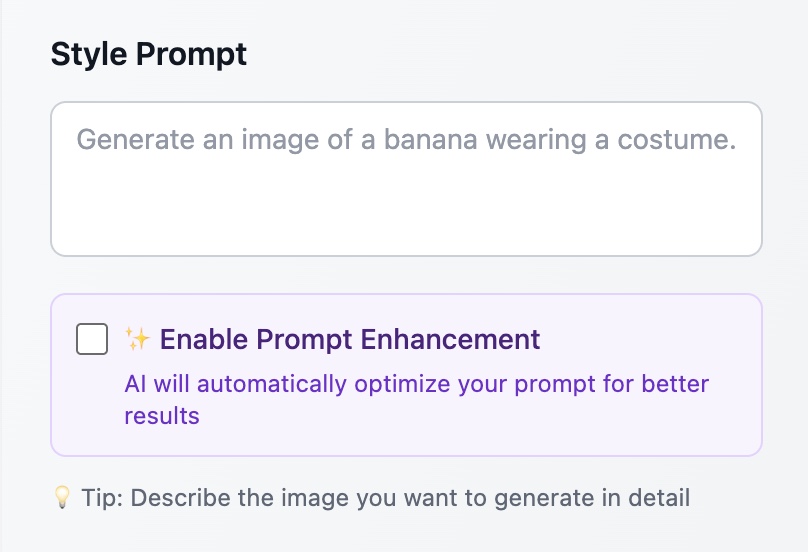
Step 3: Enable Enhancement
Check the "✨ Enable Prompt Enhancement" checkbox below the prompt box.
Step 4: Click Enhance
Click the purple "⚡ Enhance Prompt" button that appears.
Step 5: Review and Generate
The AI will optimize your prompt in seconds. Review the enhanced version, make any adjustments if needed, then click "Generate" to create your image.
Why Use Prompt Enhancement?
For Beginners
If you're new to AI image generation, writing effective prompts can be challenging. You might not know the technical terms or best practices. Prompt enhancement handles this for you, ensuring professional results even from simple descriptions.
For Professionals
Even experienced users can benefit from:
- Time Saving: No need to manually type out detailed lighting and composition terms
- Consistency: Get consistently well-structured prompts
- Inspiration: Discover new ways to describe lighting and atmosphere
- Quality: Leverage professional photography terminology automatically
For Everyone
- Better Results: More detailed prompts = better AI-generated images
- Learning Tool: See how simple prompts are transformed into professional ones
- Flexibility: You can still edit the enhanced prompt before generating
Technical Details
Powered by Gemini AI
We use Google's Gemini 2.0 Flash model, which excels at understanding natural language and generating creative, detailed descriptions. The model has been specifically instructed to focus on:
- Lighting and shadow descriptions (highest priority)
- Style and composition details
- Professional photography terminology
- Natural, readable language
Privacy and Security
- All prompt enhancement requests are authenticated
- Your prompts are processed securely through our API
- No prompt data is stored or used for training
Performance
- Average enhancement time: 1-3 seconds
- Automatic retry on network issues
- Graceful error handling with helpful messages
Best Practices
Start Simple
Don't overthink your initial prompt. Simple descriptions work best:
- ✅ "a sunset over mountains"
- ✅ "portrait of a woman"
- ❌ "a highly detailed, photorealistic, 8k resolution sunset..."
Review Before Generating
Always review the enhanced prompt. The AI is smart, but you might want to:
- Adjust specific details
- Remove elements you don't want
- Add personal touches
Combine with Image Upload
For image editing tasks, upload your image first, then use enhancement to optimize your editing instructions.
Experiment
Try the same basic prompt multiple times - the AI might generate different variations, giving you creative options.
Examples Gallery
Portrait Photography
Input: portrait of a person
Enhanced: Professional portrait of a person with Rembrandt lighting setup, soft key light from 45-degree angle creating subtle shadow on one side of the face, warm color temperature, shallow depth of field with bokeh background, studio quality with natural skin tones
Landscape Photography
Input: mountain landscape
Enhanced: Majestic mountain landscape during golden hour, dramatic side lighting illuminating snow-capped peaks, long shadows stretching across valleys, volumetric light rays breaking through clouds, rich color saturation with deep blues and warm oranges, cinematic wide-angle composition
Product Photography
Input: coffee cup on table
Enhanced: Elegant coffee cup on wooden table, soft diffused window light from the left creating gentle highlights on the ceramic surface, subtle cast shadow, warm ambient lighting, shallow depth of field, commercial product photography style with clean composition
Food Photography
Input: plate of pasta
Enhanced: Artfully plated pasta dish with soft overhead lighting, gentle rim light highlighting steam and texture, warm color palette, shallow depth of field focusing on foreground, subtle shadows adding depth, professional food photography style
Frequently Asked Questions
Does enhancement cost extra credits?
No! Prompt enhancement is completely free. You only use credits when you generate the actual image.
Can I use it without uploading images?
Yes! Prompt enhancement works for both text-to-image generation and image editing scenarios.
What if I don't like the enhanced version?
You can always edit the enhanced prompt or revert to your original. The enhancement is just a suggestion.
Does it work in Chinese?
Absolutely! The AI handles both English and Chinese prompts naturally.
Can I turn it off?
Yes, simply uncheck the enhancement checkbox. The feature is completely optional.
Will it change my original idea?
No. The AI is instructed to keep your core intent and subject intact, only adding technical details to improve the output quality.
What's Next?
We're continuously improving the prompt enhancement feature based on user feedback. Upcoming improvements include:
- Style Presets: Choose specific photography or art styles (portrait, landscape, product, etc.)
- Intensity Control: Adjust how much enhancement to apply
- Learning Mode: See side-by-side comparisons of original vs enhanced results
- Prompt History: Save and reuse your favorite enhanced prompts
Try It Now!
Ready to create better AI images with less effort? Head over to Nano Banana and try the new prompt enhancement feature today!
We'd love to hear your feedback. What kind of images are you creating? How has prompt enhancement helped you? Share your results and suggestions using the feedback button on any page.
About Nano Banana
Nano Banana is our AI-powered image generation and editing tool, powered by Google's Gemini 2.5 Flash Image Preview model. It allows you to:
- Generate images from text descriptions
- Edit and modify uploaded images
- Merge multiple images with AI
- Create professional-quality visuals in seconds
With the new prompt enhancement feature, Nano Banana becomes even more powerful and accessible to users of all skill levels.
Happy creating! 🎨✨